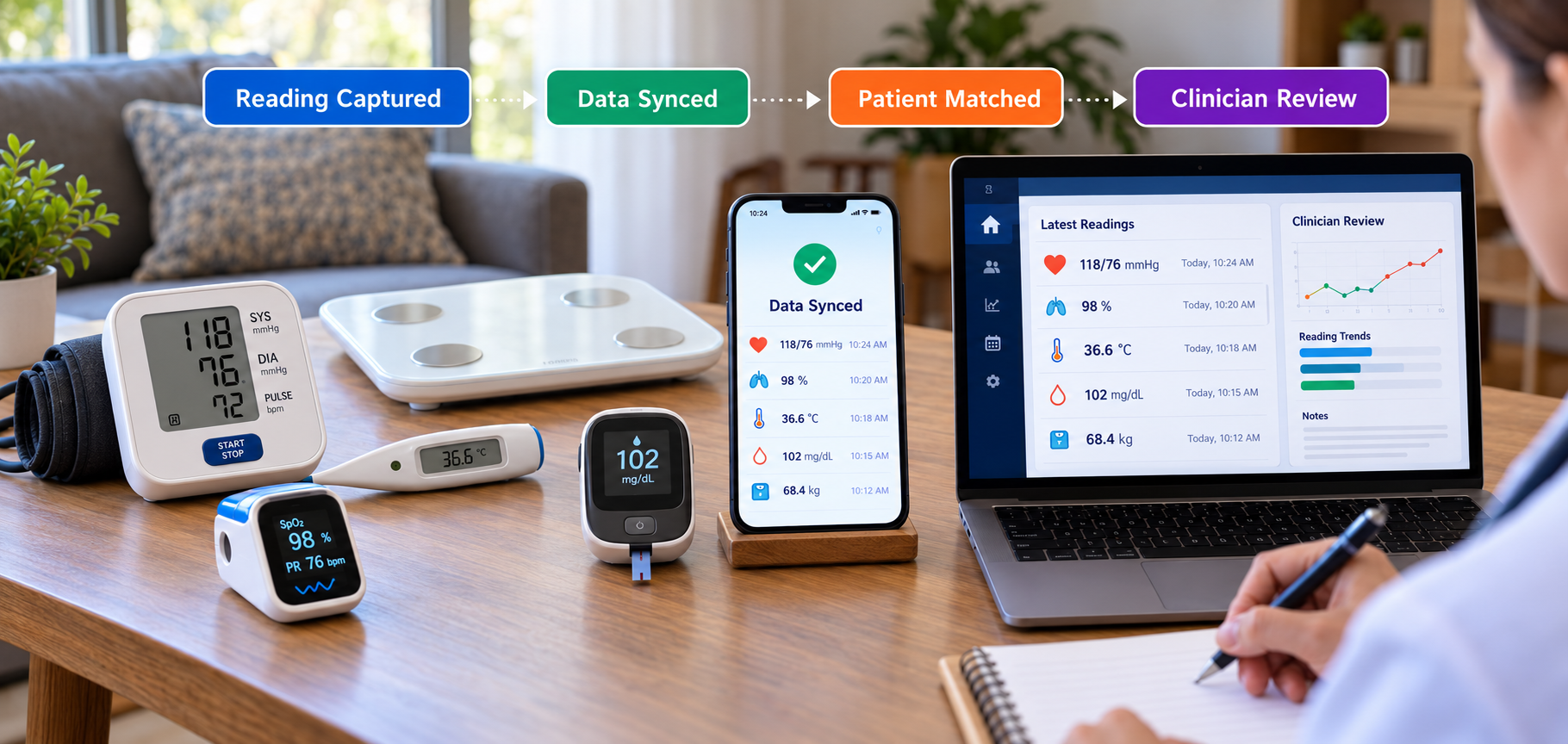


A home diagnostic reading is useful only when the complete information reaches the right telehealth workflow. A blood pressure monitor, pulse oximeter, glucose meter, thermometer, or connected scale may capture the measurement correctly, but the reading can still become delayed, duplicated, misassigned, or lose important context before a clinician sees it.
That is why home diagnostic device integration involves more than connecting hardware to an app. The data path must preserve the value, unit, timestamp, device source, patient identity, and delivery status. For connected medical devices, this means creating a reliable route from the device to an app or gateway, then through cloud services and APIs into the telehealth platform.
Where Data Gaps Appear Between the Home Device and Telehealth Platform
A home reading rarely moves directly from the device to the clinician. In most systems, it passes through several components:
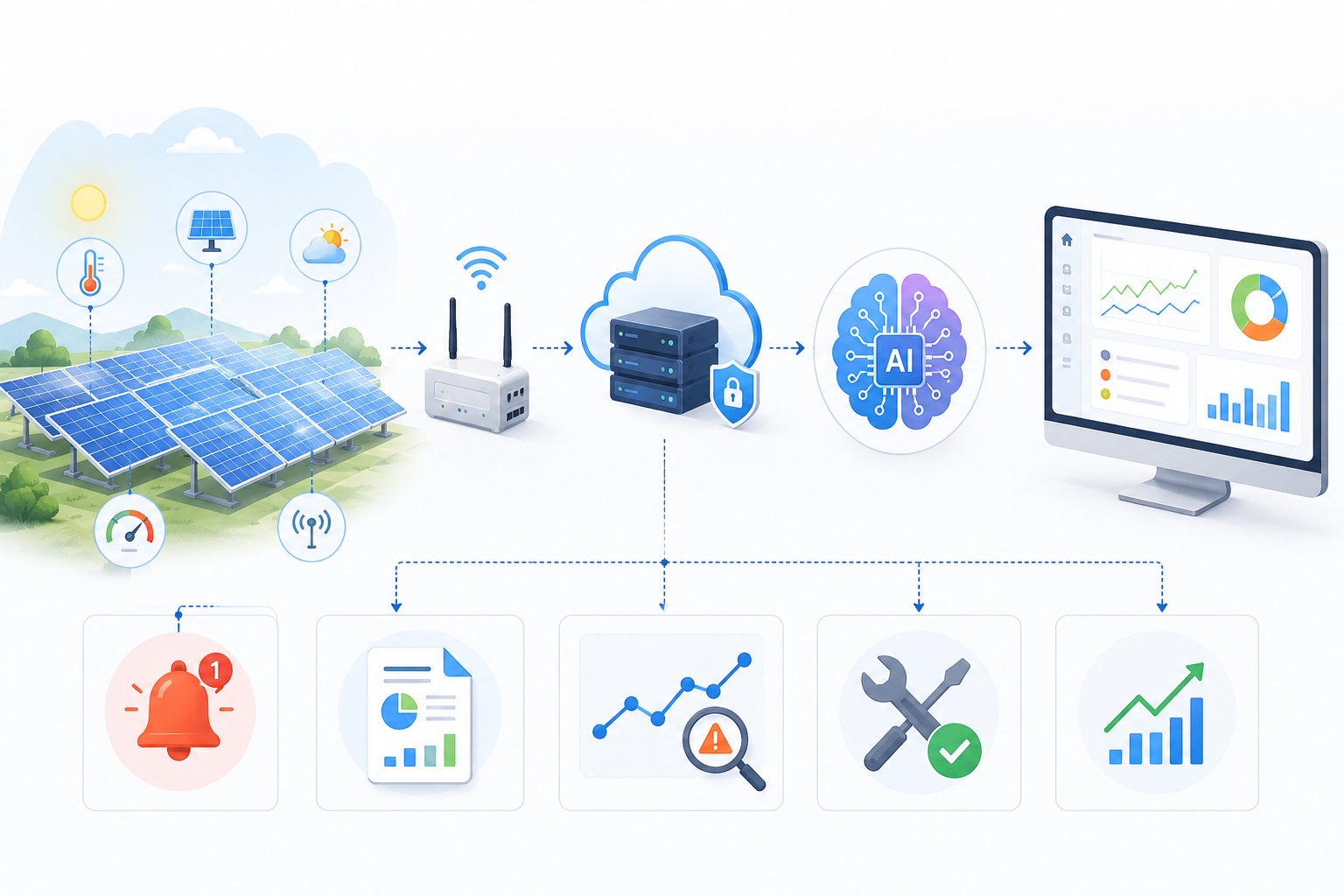
Device → Smartphone or Gateway → Internet → Cloud Service → API → Telehealth Platform
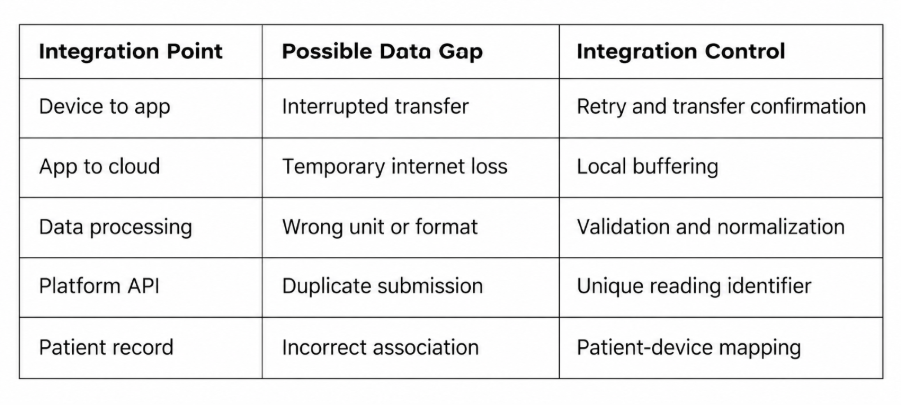
Each step can introduce a data problem. In medical device data integration, a BLE connection may drop before transfer completes, an app may lose internet access before uploading, or a retry may submit the same reading twice.
The same challenge applies to home health device integration across multiple manufacturers. Devices may use different field names, formats, units, or metadata. A reading can also arrive without a reliable patient association.
The integration should recognize failures, preserve complete readings, and make delivery status visible.
Build a Reliable Device-to-Platform Data Path
A reliable integration works best when each stage has a clear responsibility. The device captures the measurement, the app or gateway receives it, the backend validates it, and the telehealth platform presents it in the correct patient context.
Capture the Reading from the Home Device
Home diagnostic devices may communicate through Bluetooth Low Energy, Wi-Fi, cellular connectivity, a manufacturer SDK, or another supported interface.
With BLE medical device integration, the receiving app should know whether the complete measurement has transferred before treating it as captured. This is important when one reading contains several related values or metadata fields.
Reliable IoT integration starts with understanding how the device communicates, what data it sends, and how the software confirms that the transfer has finished.
Use the Mobile App or Gateway as More Than Pass-through
The mobile app or gateway often has an important role between the device and the cloud. In a practical IoT healthcare integration, it may receive the measurement, associate it with the correct device and patient, store it temporarily, and track whether upload succeeds.
If a patient takes a blood pressure reading while internet access is unavailable, local buffering can retain the completed reading until connectivity returns. The original measurement time should remain attached to it.
Confirm Delivery Instead of Assuming It
Sending a request to an API does not always mean the receiving system accepted and stored the reading.
The integration should distinguish between sent, accepted, failed, and pending delivery where appropriate. API acknowledgements, retry logic, unique reading identifiers, and logging can show what happened.
If an app retries because it did not receive a response, the backend should be able to recognize the same measurement rather than create a new one.
Preserve the Meaning of the Reading, Not Just the Number
A value such as “120” is not enough for a healthcare platform. The system needs to know what was measured, which unit applies, when the measurement was taken, which device produced it, and which patient it belongs to.
That is why patient-generated health data integration requires structure as well as transport. The integration layer may need to validate values, normalize device-specific formats, standardize units, preserve timestamps, and map the result into the structure expected by the receiving platform.
This is also central to telehealth interoperability because different devices and systems need a consistent way to understand the same information.
FHIR integration can support standardized representation and exchange of healthcare data where FHIR is appropriate for the systems involved. HL7's Personal Health Device Implementation Guide describes personal health devices, a Personal Health Gateway, and the transformation of device observations into FHIR resources for receiving systems. It also addresses timing information for device-generated observations.
Normalization matters because the platform needs meaning, not just raw values. A correct number with the wrong unit, timestamp, or patient context can still be unusable.
Handle Delays, Duplicates, and Patient Mismatches Before They Reach Clinicians
A strong remote patient monitoring integration should account for delivery problems before data reaches the clinician-facing workflow.
Delayed Data
A diagnostic reading can be measured at one time and transmitted later because a phone is offline, a gateway loses connectivity, or a cloud endpoint is unavailable.
The system should preserve the original measurement timestamp instead of replacing it with upload time:
Measurement time: when the patient took the reading
Transmission time: when the platform received it
Keeping both clear helps the telehealth system present an accurate sequence of events.
Duplicate Data
Retries are useful, but they can create duplicates if the backend treats every request as new.
A unique reading identifier, idempotent API handling, and duplicate checks can help prevent one measurement from appearing multiple times because the app retried delivery.
Patient and Device Mismatches
The platform also needs a dependable relationship between:
Patient account ↔ Device ↔ Reading
Controlled device registration, authenticated sessions, and backend patient-device mapping can help maintain that relationship. The exact approach depends on the product architecture.
For remote health monitoring, this mapping is important because a technically valid reading is only useful when it appears in the correct patient context.
Connect Diagnostic Data to the Actual Telehealth Workflow
The goal of telehealth device integration is not simply to put data into a database. The information needs to be available where the care team uses it.
A practical flow may look like this:
Reading received → Validated → Patient matched → Trend updated → Telehealth profile updated → Clinician review
Some products may also exchange information with an EHR or another clinical system. HL7 integration can be relevant in environments that use HL7-based interfaces, while other systems may use FHIR APIs, REST APIs, vendor APIs, or a combination of methods.
The platform should distinguish data transport from clinical decision-making. A home reading can support consultation context, trend review, configured workflows, or follow-up without assuming that every measurement should automatically trigger a clinical decision.
When planning IoT in telemedicine, device connectivity should therefore be designed around the complete clinician workflow rather than ending when the data reaches cloud storage.
What to Define Before Developing the Integration
Before development, product and engineering teams should define the full data path rather than focus only on device pairing.
- Which home diagnostic devices will be supported?
- Does each device use BLE, Wi-Fi, an SDK, a cloud API, or another interface?
- Where will completed readings be stored if the connection is temporarily unavailable?
- What uniquely identifies each measurement?
- How will the patient-device relationship be maintained?
- What data structure does the telehealth platform expect?
- Does the environment require FHIR, HL7, REST APIs, vendor APIs, or another method?
- What should happen when delivery fails at each stage?
- What information must appear with the reading for clinician review?
Defining these decisions early helps align retry behavior, validation, mapping, API contracts, and monitoring around the same workflow.
Frequently Asked Questions
How do home diagnostic devices connect to telehealth platforms?
A device may send readings through BLE, Wi-Fi, cellular connectivity, an SDK, or a vendor API. A mobile app or gateway receives the data, then a backend validates and maps it before sending it to the telehealth platform.
What happens if a home diagnostic device loses internet connectivity?
If the application architecture supports local storage or buffering, a completed reading can be retained temporarily and uploaded when connectivity returns. The system should preserve the original measurement time and track whether delivery succeeds.
How can telehealth platforms prevent duplicate device readings?
Unique reading identifiers, API acknowledgements, idempotent request handling, and duplicate checks can help a backend recognize retries and avoid creating multiple records for the same measurement.
Is FHIR required for telehealth device integration?
No. FHIR can provide a standardized way to represent and exchange health data, but the required integration method depends on the connected systems. Some environments may use HL7 interfaces, REST APIs, vendor APIs, or combinations of these technologies.
Keep the Full Diagnostic Context Intact
Connecting a home diagnostic device is only one part of the solution. The full integration needs to preserve the reading through device communication, temporary storage, validation, normalization, API delivery, patient matching, and clinician access.
Bluetooth Low Energy, IoT APIs, and HL7-based healthcare integration can support different parts of that flow when they match the product requirements.
Theta Technolabs develops IoT and BLE integrations that connect healthcare devices with telehealth and digital health platforms while keeping device-to-platform data structured and traceable. For project discussions, contact sales@thetatechnolabs.com.


_How%20Cloud%20Solutions%20Are%20Enhancing%20Remote%20Patient%20Monitoring%20in%20Healthcare_Q4_25.jpg)
_Streamlining%20Appointment%20Scheduling%20with%20Cloud%20Computing%20in%20Dallas%20Healthcare_Q4_25.jpg)
_The%20Impact%20of%20Cross-Platform%20Apps%20on%20Real%20Estate%20Market%20Trends%20in%20Dallas_Q3_24-1.jpg)
_How%20AI%20is%20Enhancing%20Construction%20Site%20Surveillance%20and%20Security%20in%20Dallas_Q3_24-1.jpg)
_Web%20Apps%20for%20Retail%20and%20eCommerce_%20Streamlining%20Operations%20and%20Reducing%20Costs_Q3_24.jpg)
_Enhancing%20Driver%20Safety%20and%20Compliance%20with%20Web%20Apps%20in%20the%20Logistics%20Sector_Q3_24.jpg)


_Integrating%20Chatbots%20Into%20Your%20Application.jpg)
_How%20much%20does%20it%20cost%20to%20create%20an%20android%20app%20in%202024%20for%20Startups_%20A%20detailed%20guide_Q2_24.jpg)
_Key%20Trends%20in%20Healthcare%20Software%20Development%20for%20the%20Future_Q2_24.jpg)
_Best%20iOS%20App%20Development%20Company_%20Enhancing%20User%20Engagement%20with%20Push%20Notifications_Q2_24.jpg)
_Chatbots%20for%20Event%20Management%20and%20Hospitality%20Services_Q1_24.jpg)
_Choosing%20the%20Right%20App%20Development%20Company_%20A%20Comprehensive%20Guide_Q1_24.jpg)